 Beautiful Ruby
Beautiful RubyEssays, tutorials, and deep dives on writing Ruby that feels as good as it reads.

Video Course
Phlex on Rails
7+ hours · 45 lessons
Last month a Solid Queue job at [Beautiful Ruby](https://beautifulruby.com) hung on a slow Anthropic API call. Workers wedged. ActiveRecord pool drained. Pager going off. The fix should have been obvious: tell the kernel to give up after a deadline. Ruby doesn't expose that knob. So I built it.

If you've got a Sidekiq job hitting Stripe, a Solid Queue worker sending email through Mailgun, or any background processor talking to any vendor, this is your future too. You just haven't lived it yet.

If you think the `:timeout` on your job is going to save you, sit down, friend. We need to talk.

## Timeout.timeout is a polite suggestion

`Timeout.timeout` doesn't actually interrupt a blocking syscall. [Mike Perham called it Ruby's most dangerous API back in 2015](https://www.mikeperham.com/2015/05/08/timeout-rubys-most-dangerous-api/). I walked the mechanism end to end in [Put the timeout on the connection](/code/put-the-timeout-on-the-connection). Plenty of other Rubyists have written the same warning in the years since.

The standard library still ships it. Nobody has fixed the underlying problem.

So if your HTTP client didn't have a `read_timeout` set, the thread is gone for as long as the kernel feels like waiting. That can be hours. The Sidekiq worker is gone with it. If the job grabbed an ActiveRecord connection on the way in, that's gone too. Other jobs back up behind an empty pool. The queue stops moving and the pager goes off.

## Yes, it happens to your queue too

Sidekiq, Solid Queue, GoodJob, Resque, DelayedJob, your hand-rolled forking worker. Same story. Job processors run jobs in Ruby threads, and a Ruby thread can't be interrupted out of a blocking syscall in a C extension. There is no holy queue. Every Ruby job processor in production is one wedged Stripe call away from this graph.

## Linux has the right knob

It's called `TCP_USER_TIMEOUT`. It's been in the kernel since 2010. The contract is short: if you've sent data and none of it has been acknowledged in N milliseconds, the kernel kills the connection. No retransmission patience. No keepalive math. Deadline expires, socket dies.

Ruby doesn't expose it.

So I wrote [`tcp_user_timeout`](https://github.com/rubymonolith/tcp_user_timeout).

```ruby
gem "tcp_user_timeout"
```

```ruby
TcpUserTimeout.with_timeout(3) do
  Anthropic::Client.new.messages.create(...)
end
```

Inside that block, every TCP socket Ruby opens has the option set via `setsockopt`. Three seconds with no acknowledged byte and the kernel tears the connection down. Your code gets `Errno::ETIMEDOUT`. No second thread. No `Thread#raise`. No politely waiting for a C extension to come back to its senses.

This is the thing that makes per-job timeouts actually fire. The `:timeout` on your Sidekiq job. The `retry_on` on your ActiveJob. None of it works without something at the kernel layer enforcing the deadline. Now there is.
MAY 2026
A Ruby Timeout that works
TCP_USER_TIMEOUT, exposed to Ruby
Almost a year ago I launched [Phlex on Rails](https://beautifulruby.com/phlex) with the videos served as MP4 from a private S3 bucket. Customers paid for the course, clicked play, watched the spinner, and left. People don't sit through buffering on something they paid for. They just leave.

So I made shipping video as easy as shipping a model.

```ruby
# app/videos/course_video.rb
class CourseVideo < ApplicationVideo
  rendition :high,   scale: 1.0
  rendition :medium, scale: 0.5
  rendition :small,  scale: 0.25

  poster :hero,      scale: 1.0
  poster :thumbnail, width: 320, height: 180
end
```

That's the whole declaration. From there, [hls](https://github.com/beautifulruby/hls) encodes the renditions, generates the posters, uploads them to your bucket, and signs every segment URL in the playlists. A controller renders the result in three lines.

```ruby
gem "hls"
```

0.2.0 just shipped. Source at [github.com/beautifulruby/hls](https://github.com/beautifulruby/hls).

## Why this used to be a slog

The fix for buffering is HLS. Players download small chunks instead of one big file, the bitrate steps down when the connection slows and back up when it speeds up, and the format runs anywhere a `<video>` element does.

Doing HLS on a *private* bucket is harder than the public version, and the differences aren't well documented. The m3u8 master playlist references variant playlists. Each variant references segment files. The player fetches as it goes. On a public bucket, every URI is a public URL and you're done.

On a private bucket, every segment URI has to be a pre-signed URL. The signing TTL has to outlast the longest viewing session that might still be fetching segments. The presign has to work with whatever S3-compatible store you picked (Tigris, Cloudflare R2, MinIO, AWS). The playlist can be cached, but the signatures inside it can't be cached longer than they're valid for. Your encoder ladder needs to produce playlists that match a controller-routable shape, not raw S3 paths. Re-encoding has to be idempotent, because re-uploading 800MB of segments every time you tweak a bitrate costs real money and real minutes.

Forty-three lines of bespoke Ruby per stream. That was the answer.

I wanted profile classes.

## Why not just use Mux?

I looked at [Mux](https://www.mux.com) first. It's good. For a high-volume video product, paying Mux is the right answer.
MAY 2026
HLS
Shipping video should be as easy as shipping a model.
```ruby
Timeout.timeout(3) do
  make_anthropic_call
end
```

How does this code kill your Rails app's scaling?

## The war story

Last month, a Solid Queue job that called the [Anthropic Ruby SDK](https://github.com/anthropics/anthropic-sdk-ruby) started taking the app down under load. Normal completions came back in a second or two. A fraction took longer. Once in a while the connection just sat there, open, silent, forever.

The symptom wasn't the vendor. It was the database. `ActiveRecord::ConnectionTimeoutError` everywhere. Pool exhausted.

### First theory: LLM calls were pinning a DB connection for the whole job

A 10-second completion would hold a checkout for 10 seconds. Rails 7.2 made this behavior explicit by renaming `ActiveRecord::Base.connection` to `.lease_connection`: the connection is leased for the entire job unless you scope it. So I wrapped the ActiveRecord parts in `ActiveRecord::Base.with_connection` blocks to release the checkout before the HTTP call. Pool still drained. Ruled out.

### Second theory: a thread leak

Nope. The threads were alive. They just weren't doing anything. Every Solid Queue worker was sitting inside an HTTP call to the vendor, waiting for bytes that weren't coming.

Then I found the code at the top of this article in one of the jobs. A previous version of me had wrapped the Anthropic call in `Timeout.timeout(3)`, thinking that was a 3-second budget. `rescue Timeout::Error` was firing in the logs, so the timeout was "working." But the incident didn't stop.

That's when I learned `Timeout.timeout` is not what it looks like. [Mike Perham called it Ruby's most dangerous API back in 2015](https://www.mikeperham.com/2015/05/08/timeout-rubys-most-dangerous-api/). Plenty of other Rubyists have been saying the same thing for years. I just wasn't listening.

## What Timeout.timeout actually does

It spawns a second thread that sleeps for N seconds, then calls [`Thread#raise(Timeout::Error)`](https://github.com/ruby/timeout/blob/v0.6.1/lib/timeout.rb#L171) on the caller. That's the whole mechanism.

`Thread#raise` can only deliver an exception at an interrupt check, and Ruby only checks for interrupts between bytecode instructions. If the target thread is down inside a C extension blocked on `recv()`, there is no interrupt check. The exception sits in a queue and doesn't fire until the syscall returns.

When the vendor froze, the kernel had no reason to give up. `SO_KEEPALIVE` is off by default, so a dead connection can sit open indefinitely. Turn it on and Linux's defaults still wait over two hours before declaring the socket dead. The `Timeout::Error` was eventually raised, the log message showed up, the thread unblocked. For the whole time in between, the thread was gone and the pool was wedged.

`Timeout.timeout` doesn't bound execution. It schedules an exception and hopes the blocking call cooperates.

## The real fix

Every real network client exposes its own timeouts that push down to socket options the kernel respects.
APR 2026
Put the timeout on the connection
Timeout.timeout wraps your code. The syscall doesn't care.

Phlex on Rails
Turbo Pagemorphs
Coding agents are only as good as the feedback they can get from the app they're working on. Most of the tooling I've seen so far is outside-in: run the tests, read the logs, grep the source, hit an HTTP endpoint, look at the response. That works, but it's a long way from how I actually debug a running Rails app.

When I'm debugging, I drop into `rails console`, poke at `User.find_by(...)`, inspect `ActionController::Base.descendants`, call a service object with a weird argument, and watch what blows up. The running process is the source of truth. It holds the loaded classes, the in-memory cache, the monkey-patches, the current `ENV`, and the middleware stack as it actually got assembled. Source files are just the recipe.

I think agents should be able to do the same thing, so I'm going to show how to expose an IRB session over a local socket in development and give an agent a CLI to talk to it. It's a few minutes of code and it changes what the agent can do.

## Why not just `rails runner` or a shell tool?

A few reasons `rails runner "puts User.count"` isn't the same thing:

1. **Cold boot per call.** Every invocation reloads the Rails environment. On a reasonably sized app that's 3 to 10 seconds. An agent that iterates 20 times to understand a bug just spent four minutes waiting for boot.
2. **No state carries over.** The agent can't set `u = User.last` and then poke at `u` across calls. Every question has to be self-contained, which pushes the agent toward writing bigger, more speculative one-shots instead of small probes.
3. **Different process.** The running dev server has the state that matters: the request you just made, the Solid Queue job mid-flight, the cache that got warmed. A fresh `runner` process sees none of it.
4. **No introspection of live objects.** `ObjectSpace.each_object(ActiveRecord::Base)` in a fresh process tells you nothing. In the live process, it tells you what the last request allocated.

A socket-attached IRB inside the running server fixes all four.

## What we're building

A background thread in the dev server listens on a Unix socket. On connect, it runs a small eval loop whose input and output are that socket. The loop runs in the context of the app, so it sees the same loaded constants, the same DB connection pool, the same everything. It's development-only, never loaded in production. The socket lives under `tmp/` with `0600` permissions so only the owning user can connect.

The client side is even simpler: a CLI that opens the socket, sends an expression, reads until the prompt comes back, and prints the output.

## The server: `config/initializers/agent_console.rb`

```ruby
# config/initializers/agent_console.rb
return unless Rails.env.development?
return if defined?(Rails::Console)        # skip inside `rails console` itself
return if $PROGRAM_NAME.end_with?("rake") # skip rake tasks

require "socket"

module AgentConsole
  SOCKET_PATH = Rails.root.join("tmp", "agent-console.sock").to_s

  def self.start!
    File.unlink(SOCKET_PATH) if File.exist?(SOCKET_PATH)
    server = UNIXServer.new(SOCKET_PATH)
    File.chmod(0o600, SOCKET_PATH)
APR 2026
Give Your Agents a REPL
Expose IRB over a Unix socket so coding agents can introspect and control a running Rails app
I've been running SQLite in production on a few Rails apps. No Postgres process to manage, no connection pool to tune, backups are just file copies. But one thing caught me off guard: how do you replace the database file on a running server?

## The problem

Say you have a content-heavy Rails app. You build the SQLite database locally (import from a CMS, run transforms, generate search indexes) then ship that file to production. With Postgres you'd `pg_restore` into the running database. With SQLite, the database *is* a file. You need to swap it.

The naive approach is `scp` the file over and restart the server. That works, but it means downtime. Your app is offline while Puma restarts, reconnects, and warms up. For a content update that should take milliseconds, you're paying seconds.

You could try `mv new.db production.db` while the app is running, but that's a race condition. ActiveRecord might be mid-query when you yank the file out from under it. You'll get `BusyException` or worse, a corrupted read.

I wanted something like `pg_restore` but for SQLite: push a new database to the running server, validate it, pause requests for a few microseconds while it swaps, then resume.

## What Hotswap does

[Hotswap](https://github.com/rubymonolith/hotswap) adds a Unix socket server to your Rails app. You send it a new SQLite database, it validates the file, then atomically swaps it into place. Incoming requests queue for microseconds during the swap, then resume on the new database.

```ruby
gem "hotswap"
```

The railtie handles everything: it inserts a Rack middleware that wraps requests in a mutex, starts the socket server when Puma boots, and discovers your SQLite databases from `database.yml`.

### Pushing a database

```bash
bin/hotswap cp ./new.sqlite3 db/production.sqlite3
```

Here's what happens:

1. The CLI connects to the socket server inside your running Rails process
2. The database streams to a temp file on the server
3. `PRAGMA integrity_check` verifies the file isn't corrupt
4. Schema is compared against the running database
5. Swap lock acquired, incoming requests queue
6. ActiveRecord disconnects, temp file is atomically renamed, ActiveRecord reconnects
7. Lock releases, queued requests resume on the new database

If the integrity check or schema check fails, the running database is untouched. Nothing gets swapped.
MAR 2026
Hotswap
Replace a SQLite database on a running Rails server without restarting
I've been playing around with adding AI features to Rails apps and ran into a problem: tool calling doesn't scale.

The standard approach is to define discrete functions, the LLM picks which one to call, and I execute it. That works great for fixed actions like "cancel order" or "send refund". But then a customer asks "what's my total spend on shipped orders this year?" and I realize I need a `total_spend_by_status_and_date_range` tool I didn't build.

I could add that tool. Then add another one for "average order value by month". Then another for "orders over $100 in Q3". The tool list grows with every new question, each one is a round-trip, and I'm forever playing catch-up.

## What if the LLM just wrote the code?

One `eval` call replaces dozens of specialized tools:

```ruby
orders().select { |o| o["status"] == "shipped" }.sum { |o| o["total"] }
```

The LLM can reason in code. It fetches data, filters it, computes a result. No back-and-forth. No predefined tool for every possible query.

The problem is obvious: `eval` in your Ruby process is catastrophic. The LLM can do anything your app can do. `User.destroy_all`. `File.read("/etc/passwd")`. `system("curl attacker.com")`. One prompt injection in a ticket body and you're done.

## What Enclave does

[Enclave](https://github.com/rubymonolith/enclave) lets you run LLM-generated Ruby without giving it access to your system. It embeds [MRuby](https://mruby.org), a lightweight Ruby interpreter, as a separate VM inside your process. This VM has no file system, no network, no access to your CRuby runtime.

Here's what a tools class looks like for a customer service agent:

```ruby
class CustomerServiceTools
  def initialize(customer)
    @customer = customer
  end

  def customer_info
    { id: @customer.id, name: @customer.name, email: @customer.email,
      plan: @customer.plan, created_at: @customer.created_at.to_s }
  end

  def orders
    @customer.orders.order(created_at: :desc).map do |o|
      { id: o.id, total: o.total.to_f, status: o.status, created_at: o.created_at.to_s }
    end
  end
FEB 2026
Enclave
An MRuby sandbox for running arbitrary Ruby code from LLMs

Phlex on Rails
Getting Started
Dave Thomas's ["Stop Using Classes"](https://www.youtube.com/watch?v=sjuCiIdMe_4) talk at [SFRuby](https://www.meetup.com/sf-ruby/) has me rethinking how I use modules. His argument is simple: Ruby developers reach for classes by default when modules are often the better tool.

I kept writing these little singleton objects that don't hold state. They're just bags of behavior and data. Every time I reached for a class, I'd end up with an `initialize` that does nothing and a `.new` call that exists only because classes demand it. Dave's talk gave me the push to stop doing that and think harder about modules.

## The problem with `extend self`

The standard module-as-singleton pattern is `extend self`:

```ruby
module Wordpress
  extend self

  def name = "WordPress"
  def match?(doc) = doc.at_css('meta[name="generator"][content^="WordPress"]')
end

Wordpress.name      # => "WordPress"
Wordpress.match?(doc) # => true/false
```

It works, but it's boilerplate. Every module needs it. And if you want shared behavior across a family of these singleton modules, you're stuck writing it into each one or reaching for metaprogramming. That's exactly the kind of thing `include` should solve.

## What I actually want

I'm building a framework detector for [OpenGraph+](https://opengraphplus.com) that inspects HTML documents and identifies what platform built them. Each framework is a singleton module that knows its name, its slug, and which CSS selectors identify it.

Dave's talk got me thinking about what the ideal version of this looks like:

1. Each framework is a module with instance-style method definitions
2. Including a shared module auto-wires everything up
3. All frameworks register themselves automatically
4. The parent module provides a `detect` method to find which framework matches

Here's what I landed on:

```ruby
module Framework
  @all = []

  def self.all = @all
FEB 2026
Framework Detection
Using Ruby modules as singleton objects without extend self
This week I've seen a lot of posts characterizing RSpec and factories as inherently slow and inferior to Minitest and fixtures.
[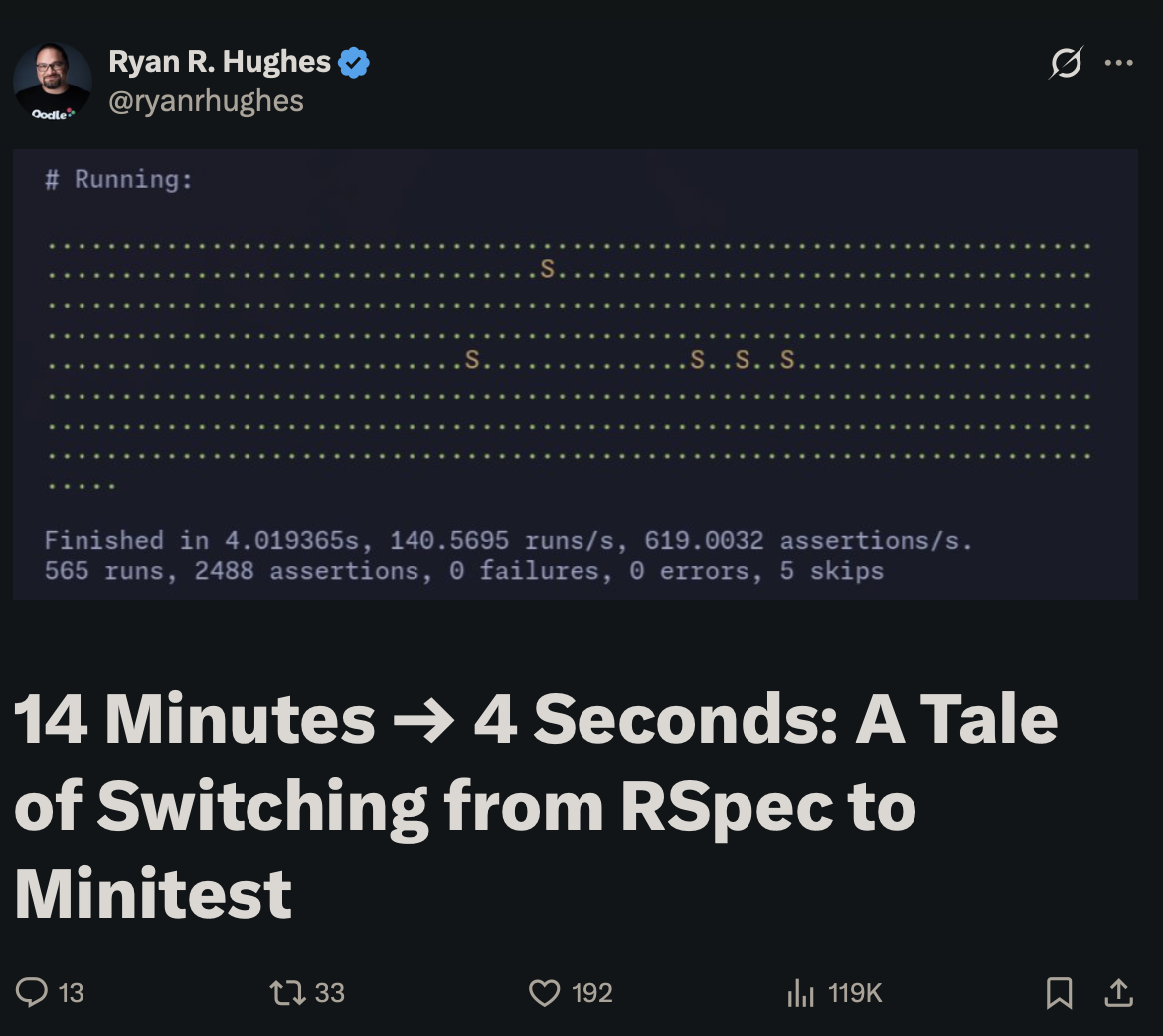](https://x.com/ryanrhughes/status/2019258699001294911?s=20)
The premise that spec-based development with factories is inherently slower than minitest and fixtures didn't pass my smell test, so I dug in to find out why people are seeing such dramatic speed-ups in these rewrites, and figure out if something could be fixed with RSpec or FactoryBot so we could keep our nice syntax.
## Factories are slow
Ok so turns out, factories are slow. Before I dug into this, I didn't understand exactly why, but I found out that it's way too easy to accidentally create boatloads of records when setting up factories.
The reason? Setting up a single user factory might seem fast at first glance, but it might have to create an associated account record, which might have associated billing records, which might have ... it turns out these graphs can get quite large.
Fixtures are fast because the data is loaded directly into the database for a suite, then each test starts a transaction and rolls it back. So much faster!
## Fixture syntax is tedious
The reason I don't like fixtures isn't because I like factories, it's because I like the syntactic sugar of factories.
I did what any self-respecting Rubyist would do and created a gem with the syntactic sugar of factories and the speed of fixtures called [FixtureBot](https://github.com/rubymonolith/fixturebot).
## FixtureBot
Here's what a FixtureBot looks like for a blog application:
```ruby
FixtureBot.define do
user.email { |fixture| "#{fixture.key}@blog.test" }
user :brad do
name "Brad"
email "brad@blog.test"
end
user :alice do
name "Alice"
# "alice@blog.test" is auotmatically generated
end
user :charlie do
name "Charlie"
FEB 2026
Don't throw the specs out with the factories
FixtureBot gives you the speed of fixtures with the syntax of factories
After building pricing objects in [last week's post](./superfeature-price), the next challenge was figuring out how to organize features across different pricing tiers. Every SaaS product I've worked on eventually becomes a tangled mess of `if current_user.plan == "pro"` checks scattered throughout the codebase.

I decided to solve this problem in the [Superfeature gem](https://github.com/rubymonolith/superfeature) by creating a `Plan` class that makes defining SaaS pricing tiers declarative and maintainable.

## Defining a plan

Plans are Ruby classes that inherit from `Superfeature::Plan`:

```ruby
class Plans::Website::Free < Superfeature::Plan
  def name = "Free"
  def tagline = "Get started for free"
  def price = Price(0)
end
```

This gives you a clean interface for plan metadata. The `Price()` method is from [Superfeature::Price](./superfeature-price), so pricing and plans work together naturally.

## Plan inheritance

Here's where things get interesting. Plans can inherit from each other:

```ruby
class Plans::Website::Creator < Plans::Website::Free
  def name = "Creator"
  def tagline = "For content creators"
  def price = Price(19)
end

class Plans::Website::Business < Plans::Website::Creator
  def name = "Business"
  def tagline = "For growing businesses"
  def price = Price(99)
end
```

This inheritance isn't just for code reuse—it represents the natural hierarchy of SaaS tiers where higher tiers include everything from lower tiers. I'm still learning if it makes sense to inherit from the previous plan or from a base plan.

## Limits
FEB 2026
Superfeature Plan
A Ruby DSL for defining SaaS pricing plans and features

Phlex on Rails
Testing
I've worked with enough SaaS products to know that prices are a bit of a pain in the butt. At first, they seem like numbers, but then you have your first Black Friday sale and begin to understand how tedious it is to display discounts throughout a website.

I decided to end this battle once and for all while working on my latest project, [OpenGraph+](https://og.plus), by directing Claude Code to build a `Price` object that makes working with prices and discounts straightforward in the [Superfeature gem](https://github.com/rubymonolith/superfeature).

## Setting prices

Creating prices is straightforward:

```ruby
price = Superfeature::Price.new(49.99)
price.amount  # => BigDecimal("49.99")
price.to_f    # => 49.99
price.to_i    # => 49
```

There's also a handy `Price()` method for when you want something more concise:

```ruby
price = Price(29)
price.to_formatted_s           # => "29.00"
price.to_formatted_s(decimals: 0) # => "29"
```

## Discounts

This is where things get interesting. You can apply discounts in several ways:

```ruby
price = Price(100)
price.discount_fixed(20).amount    # => 80.0
price.discount_percent(25).amount  # => 75.0
price.discount_to(79).amount       # => 79.0
```

Superfeature also parses discount strings naturally. "20%" applies a percentage reduction, "$15" subtracts dollars, and a plain number defaults to dollars:

```ruby
price = Price(100)
price.apply_discount("20%").amount  # => 80.0
price.apply_discount("$15").amount  # => 85.0
JAN 2026
Superfeature Price
A Ruby object for working with prices and discounts
One of Superform's strengths is giving developers complete control over how form errors are displayed. Rather than being locked into a specific CSS framework's conventions, you can customize error styling to work with DaisyUI, Tailwind, Bootstrap, or any other framework you prefer.

## Custom Field class with error helpers

The key is extending `Superform::Rails::Form::Field` with your own error helpers. Here's an example that works with DaisyUI:

```ruby
# ./app/components/form.rb
class Components::Form < Superform::Rails::Form
  class Field < Superform::Rails::Form::Field
    # A single sentence for inclusion below an input.
    def error_message
      "#{key.to_s.titleize} #{errors.to_sentence}" if errors.any?
    end

    def input(*, **attributes)
      super(*, **mix(
        {
          class: [
            "input input-outline w-full",
            ("input-error" if field.invalid?)
          ]
        },
        attributes)
      )
    end

    def textarea(*, **attributes)
      super(*, **mix(
        {
          class: [
            "textarea textarea-outline w-full",
            ("input-error" if field.invalid?)
          ]
        },
        attributes)
      )
    end
  end
end
JAN 2026
Adding form errors to Superform fields
Display validation errors with any CSS framework
[Last week I walked through Fizzy](./fizzy), the latest product released by 37 Signals, and completely missed the [`fizzy-saas` repo](https://github.com/basecamp/fizzy-saas). I cracked open that repo and discovered references to the mysterious "Queen Bee" gem.

Watch the video and let's dive in.

## Fizzy SaaS

The first thing I noticed about the Fizzy SaaS repo is the gemspec that has all of these dependencies:

```ruby
spec.add_dependency "rails", ">= 8.1.0.beta1"
spec.add_dependency "queenbee"
spec.add_dependency "rails_structured_logging"
spec.add_dependency "sentry-ruby"
spec.add_dependency "sentry-rails"
spec.add_dependency "yabeda"
spec.add_dependency "yabeda-actioncable"
spec.add_dependency "yabeda-activejob"
spec.add_dependency "yabeda-gc"
spec.add_dependency "yabeda-http_requests"
spec.add_dependency "yabeda-prometheus-mmap"
spec.add_dependency "yabeda-puma-plugin"
spec.add_dependency "yabeda-rails", ">= 0.10"
spec.add_dependency "prometheus-client-mmap", "~> 1.4.0"
spec.add_dependency "console1984"
spec.add_dependency "audits1984"
```

They're all monitoring and auditing gems, which makes sense when deploying a Rails application to production. There wasn't much else to the repo, just a signup flow and something that looks like a signup page.

What I'm still not clear about is why the main `fizzy` repo has a [Gemfile.saas with similar dependencies](https://github.com/basecamp/fizzy/blob/main/Gemfile.saas). Here's why the file is interesting:

```ruby
gem "activeresource", require: "active_resource"
gem "queenbee", bc: "queenbee-plugin" # 🐝
gem "fizzy-saas", bc: "fizzy-saas"
```

See the `queenbee` and `activeresource` gems?

## "Queen Bee"
DEC 2025
Fizzy SaaS & the mysterious Queen Bee
I walk through the source code of the latest Rails application open-sourced by 37 Signals

Phlex on Rails
Views in controllers
37 Signals released [Fizzy](https://www.fizzy.do) today, which is their take on a Kanban board. What surprised everybody was that they also released the source code for it. There's a lot to look at, which I cover in this video.

Let's look at a few things I call out in the video that I need to elaborate on.

## Nested resources

I particularly enjoyed the approach to nesting resources with controller modules. Here's an example from their routes.rb file. We'll be focusing on the `not_now` resource.

```ruby
namespace :columns do
  resources :cards do
    scope module: :cards do
      namespace :drops do
        resource :not_now   # Maps to Columns::Cards::Drops::NotNowsController
        resource :stream
        resource :closure
        resource :column
      end
    end
  end
end
```

Here's the controller it maps to.

```ruby
class Columns::Cards::Drops::NotNowsController < ApplicationController
  include CardScoped

  def create
    @card.postpone
  end
end
```

Simple! I immediately know a `POST /columns/cards/:card_id/drops/not_now` will do something.

### Restomatic

In my projects, I take the same approach, but I've cleaned up the routes a bit with a gem called [Restomatic](https://github.com/rubymonolith/restomatic). Here's how the gem would clean up the Fizzy routes file.
DEC 2025
37 Signals Fizzy Kanban board
I walk through the source code of the latest Rails application open-sourced by 37 Signals
NOV 2025
2025 Ruby Cyber Monday & Black Friday Deals
Save money on Ruby books, courses, licenses, & software
NOV 2025
Beautiful Ruby: The First Update
Pre-sold $13,000 of Phlex on Rails video course

Phlex on Rails
Why Rails?
OCT 2025
Introducing Phlex on Rails
Officially launching a video course for building component-based UIs in Rails
In markdown, an image tag look something like this when you want to drop it into a document.
```markdown

```
For my projects, I don't think of these tags *strictly* as images, but rather blocks of content with an image representation. In practice, that means I want to embed YouTube videos in my content pages like this:
```markdown

```
Out of the box this wouldn't work, but fortunately since I use the [Markdown Rails](https://github.com/sitepress/markdown-rails) gem, I can intercept image tags and process them as blocks of content. Here's what my Markdown parser looks like in my application.
```ruby
class ApplicationMarkdown < MarkdownRails::Renderer::Rails
# Process markdown image blocks
def image(link, title, alt)
url = URI(link)
case url.host
when "youtu.be"
youtube_tag url, alt
else
super
end
end
# ...
private
# This is provided as an example; there's many more YouTube URLs that this wouldn't catch.
def youtube_tag(url, alt)
<<~HTML
<iframe
class="aspect-video w-full rounded"
src="https://www.youtube-nocookie.com/embed#{url.path}"
title="YouTube video player"
frameborder="0"
allow="accelerometer; autoplay; clipboard-write; encrypted-media; gyroscope; picture-in-picture; web-share"
referrerpolicy="strict-origin-when-cross-origin"
OCT 2025
Markdown Image Tags as YouTube and Embed Blocks
Abuse markdown image tags to easily embed YouTube videos and embedded resources in documents
OCT 2025
How I created the Phlex on Rails video course outside
An off-the-grid dev setup & recording studio that fits in a backpack

Phlex on Rails
Turbo Broadcast
OCT 2025
Phlex on Rails: Week Twelve Update
Videos have been shot & registration is live
[Supermail](https://github.com/rubymonolith/supermail) `0.2.x` has been released! It's a better way to work with emails in Rails.

Here's what a Supermail email looks like:

```ruby

# $ rails generate supermail:email User::Welcome
# ./app/emails/user/welcome.rb
class User::WelcomeEmail < ApplicationEmail
  def initialize(person:)
    @person = person
  end

  def to = @person.email
  def subject = "Welcome to Beautiful Ruby"
  def body
    super do
      <<~_
      Hi #{@person.name},

      You're going to learn a ton at https://beautifulruby.com.
      _
    end
  end
end
```

When you want to use it to send an email, you just initialize the thing like you would any Ruby class and send it.

```ruby
# You might call this from a controller
User::WelcomeEmail.new(person: @person).deliver_now
```

## ActionMailer is frustrating

Action Mailer is one of the most frustrating parts of Rails. The problem I have with it is I can never remember how to initialize it and send an email.

```ruby
# Is it this?
OCT 2025
Introducing Supermail
An easier way to work with emails in Rails.
Last week [I released Supermail](https://github.com/rubymonolith/supermail), a gem that makes working with emails in Rails much more intuitive by using a much simpler abstraction. Something I love about simpler abstractions is they often lead to pleasant discoveries, in my case creating mailto links with an instance of an email. This week I had the revelation I could use those email objects to generate mailto links.

## Generating support emails
The Beautiful Ruby checkout flow has a "cancel" state where I'm assuming the person trying to buy the [Phlex on Rails video course](/phlex) ran into problems checking out. Instead of dumping them off into a dead-end, I give them an option to email me to get help. Here's what that looks like in Supermail.
```ruby
# ./app/emails/support_email.rb
class SupportEmail < ApplicationEmail
def initialize(checkout_session:)
@checkout_session = checkout_session
end
def to = from
def subject = "Payment issue on Beautiful Ruby"
def body = <<~BODY
Hi,
I had trouble completing my payment.
Here's the checkout session ID: #{@checkout_session.id}
BODY
end
# Then from your views...
<%= link_to SupportEmail.new(checkout_session: @checkout_session).mailto, "Get help with your payment" %>
```
The `@checkout_session` is an instance of a `Stripe::Checkout::Session` object from the [Stripe Gem](https://github.com/stripe/stripe-ruby).
## Generating mailto links
Here's where the power of this simple abstraction lands: I can use it to generate mailto links that launch the users' email clients with an instance of an email.
```erb
OCT 2025
Supermail mailto links
Start more conversations with your users over email

Phlex on Rails
DaisyUI
SEP 2025
Phlex on Rails: Week Eleven Update
Hotwire, Stimulus, Turbo, and Rails World
It's fun cracking open source code in libraries to see how certain abstractions are made. In the case of [Phlex](https://phlex.fun), it has a file that lists out *all* legal HTML elements in the [standard_elements.rb](https://github.com/yippee-fun/phlex/blob/75fbae36754c63493018afa4bea500e9debaf520/lib/phlex/html/standard_elements.rb) file.

```ruby
# Outputs a `<table>` tag.
	#
	# [MDN Docs](https://developer.mozilla.org/docs/Web/HTML/Element/table)
	# [Spec](https://html.spec.whatwg.org/#the-table-element)
	register_element def table(**attributes, &content) = nil

	# Outputs a `<tbody>` tag.
	#
	# [MDN Docs](https://developer.mozilla.org/docs/Web/HTML/Element/tbody)
	# [Spec](https://html.spec.whatwg.org/#the-tbody-element)
	register_element def tbody(**attributes, &content) = nil

	# Outputs a `<td>` tag.
	#
	# [MDN Docs](https://developer.mozilla.org/docs/Web/HTML/Element/td)
	# [Spec](https://html.spec.whatwg.org/#the-td-element)
	register_element def td(**attributes, &content) = nil

	# Outputs a `<template>` tag.
	#
	# [MDN Docs](https://developer.mozilla.org/docs/Web/HTML/Element/template)
	# [Spec](https://html.spec.whatwg.org/#the-template-element)
	register_element def template(**attributes, &content) = nil

	# Outputs a `<textarea>` tag.
	#
	# [MDN Docs](https://developer.mozilla.org/docs/Web/HTML/Element/textarea)
	# [Spec](https://html.spec.whatwg.org/#the-textarea-element)
	register_element def textarea(**attributes, &content) = nil
```

This is a very concrete approach to abstracting HTML, and its one of the reasons I like Phlex. It's a very well built bridge that connects HTML and Ruby in a way that makes it easy and enjoyable to work with both.

## Language server integraton

It goes beyond that though. If your editor supports language server protocol (LSP), they show a link to the [MDN documentation](https://developer.mozilla.org/en-US/docs) for each element and a [WHATWG](https://html.spec.whatwg.org/) link to the spec.
AUG 2025
Phlex HTML Elements
How elements are defined in the Phlex library
[Superform](https://github.com/rubymonolith/superform) `0.6.x` has been released, and it's packed with a bunch of quality-of-life improvements.

### Field Kits

The old way of rendering Superforms in Ruby 3.4 looked like this:

```ruby
# The old way of rendering a Superform
render MyForm.new @user do
  render it.Field(:name).input
  render it.Field(:email).input(type: :email)
end
```

See all those `render` method calls? Nobody wants to type those. With Phlex & Field Kits, you can implicitly render fields with the `#Field` method.

```ruby
# The new way of rendering a Superform
MyForm @user do
  it.Field(:name).input
  it.Field(:email).input(type: :email)
end
```

Who doesn't like more concise code?

### Better ERB rendering

You might think I built Field Kits to make rendering in Phlex more concise—which is true—but I also built it to make rendering in ERB more concise as well. Here's what that looks like.

```erb
<%= render MyForm.new @user do
  it.Field(:name).input
  it.Field(:email).input(type: :email)
end %>
```

Notice what's missing? Developers don't have to put `<% %>` tags around every single line. This makes Superform the most concise form builder in Rails.

### Phlex 2.0 compatibility
AUG 2025
Superform 0.6.x released
Field Kits, Concise ERB rendering, Strong Parameters, Phlex 2.0, and HTML5 inputs

Phlex on Rails
Customizing
AUG 2025
Phlex on Rails: Week Ten Update
Superform updates & videos released, Github talk, and mechanical keyboards
AUG 2025
Phlex on Rails: Week Nine Update
Existing Rails Apps unit complete and gem updates
While putting together the [Phlex on Rails course](/phlex), I wanted a way to render HTML components from `rails console` so I could see the resulting HTML outside of a browser and have less distrctions for the viewers.

That means I can do this from `rails console`:

```ruby
server(dev)> render Components::PageTitleComponent.new(title: "Hi")
<!-- Before Components::PageTitleComponent -->
<div class="flex flex-col">
  <h1 class="font-semibold text-4xl flex flex-row items-center">Hi</h1>
</div>
```

## The code

Create the `./config/initializers/console.rb` file and drop in the following code:

```ruby
# config/initializers/console.rb
Rails.application.configure do
  # This block only runs when you're in the Rails console (rails c)
  console do
    # TOPLEVEL_BINDING.eval('self') gets the main object in the console
    # We're extending it with a new module to add custom methods
    TOPLEVEL_BINDING.eval('self').extend(
      Module.new do
        # Add your helper methods in here.
        def render(*args, layout: false, **kwargs)
          Rails.logger.silence do
            html = ApplicationController.renderer.render(*args, layout: layout, **kwargs)
            Nokogiri::HTML.fragment(html).to_xhtml(indent: 2)
          end
        end
      end
    )
  end
end
```

There's no great "official way" to add helpers to Rails console, so a lot of it looks hack-ish up until everything inside the `Module.new` block.
AUG 2025
Render Phlex Components from Rails Console
A handy way to render & debug basic components in isolation

Phlex on Rails
Seperating Stimulus Concerns
AUG 2025
Phlex on Rails: Week Eight Update
Finished Existing Rails app unit and published course source code
JUL 2025
Phlex on Rails: Week Seven Update
One unit complete, six more to go, and the end of summer
I'm a critic of service objects, not because they're bad, but because they're commonly misunderstood by well-meaning developers as a way to encapsulate business logic. The problem is how it's implemented. Often a developer takes a perfectly good method.

```ruby
# Perfectly good method
def hello(name)
  puts "Hello, #{name}!"
end
```

Then hides it behind a class, moves the parameters to an initializer, then hides the method invocation behind a `#call` method.

```ruby
# The greeter service object
class Greeter < ServiceObject
  def initialize(name)
    @name = name
  end

  def call
    puts "Hello, #{@name}!"
  end
end
```

Now instead of 3 lines of code, we have 9. 🥳

## A real service object

Remember how I said service objects are misunderstood? That's because they're actually good when properly used. For the [Phlex on Rails video course](/phlex) I'm building out infrastructure for [HLS video streaming](https://github.com/beautifulruby/hls) on [Tigris](https://www.tigrisdata.com). Tigris is an S3-compatible object storage service that replicates data to servers close to my customers on [Fly.io](https://fly.io) boxes.

Here's how I set up a service object to interact with my Tigris S3 service that will store my video files.

```ruby
Tigris = Aws::S3::Resource.new(
  access_key_id: ENV["VIDEO_AWS_ACCESS_KEY_ID"],
  secret_access_key: ENV["VIDEO_AWS_SECRET_ACCESS_KEY"],
  endpoint: ENV["VIDEO_S3_ENDPOINT_URL"]
)

Bucket = Tigris.bucket(ENV["VIDEO_S3_BUCKET_NAME"])
JUL 2025
Service Objects
Not your average method masquerading as a class behind a #call method

Phlex on Rails
Phlex is Ruby
JUL 2025
Phlex on Rails: Week Six Update
Video quality, a Rails 8 upgrade, and HTTP Live Streaming
When building out components in Phlex, it's very common to need slight variations on a single component to render different classes. For example, a button component might start like this:

```ruby
class Components::Button < Components::Base
  def view_template(&)
    div(class: "btn", &)
  end
end
```

Then you call it from your views using Phlex Kit like this:

```ruby
Button { "Watch the intro video" }
```

Life is good until your user asks you for a primary & secondary button.

## Class variants without gems

In Ruby, there's a good chance a gem has already solved the problem. That's true for this problem too with gems like [Phlex Variants](https://github.com/stephannv/phlex-variants) and the [Class Variant](https://github.com/avo-hq/class_variants) gems, but you might not need those.

### Subclassing

Since Phlex is just Ruby, we could subclass our button with different classes.

```ruby
class Components::Button < Components::Base
  def view_template(&)
    div(class: ["btn", classes], &)
  end

  def classes
    nil
  end
end

class PrimaryButton < Button
  def classes
    "btn-primary"
JUL 2025
Simple Phlex Class Variants
Create 10's of components with slight variations in their class names
Did you know that [Phlex Kits](https://www.phlex.fun/components/kits.html) work with ERB templates? Assuming you have the latest Phlex Rails gem installed, add this to your controller file to expose components to your ERB view context.

```ruby
class ApplicationController < ActionController::Base
  helper Components

  # ...
end
```

This registers the components from the `Components` namespace as methods in your view helpers so you can call them directly from your templates without all the "rendering ceremony", like this:

```erb
<%= FloatingLayout do |layout| %>
  <% layout.menu do %>
    <nav class="breadcrumbs text-sm">
      <ul>
        <li><%= layout.logo %></li>
      </ul>
    </nav>
  <% end %>
  <% # ... %>
<% end %>
```

## The old way

Prior to Phlex Kits, components would be called via the `render` method in the `Components` namespace.

For example, this layout component I'm working on for this website:

```ruby
class Components::FloatingLayout < Components::Base
  include Phlex::Rails::Helpers::AssetPath

  def view_template
    yield
  end

  def menu_container(*, class: nil, **)
JUL 2025
Phlex Kits in Erb
Write less code to render Phlex components from Erb templates

Phlex on Rails
Reusing forms
The [Rails form helpers](https://guides.rubyonrails.org/form_helpers.html) make working with grouped select tags extremely cumbersome because it doesn't expose the `<option>` and `<optgroup>` tags in a way that gives developers the control they need over the HTML. Consider the following example:

```ruby
grouped_options = [
  [['United States','US'], 'Canada'],
  ['Denmark','Germany','France']
]
grouped_options_for_select(grouped_options, nil, divider: '---------')
```

It emits the following HTML.

```html
<optgroup label="---------">
  <option value="US">United States</option>
  <option value="Canada">Canada</option>
</optgroup>
<optgroup label="---------">
  <option value="Denmark">Denmark</option>
  <option value="Germany">Germany</option>
  <option value="France">France</option>
</optgroup>
```

Things get even more convoluted when working with ActiveRecord and groups

```ruby
class Continent < ActiveRecord::Base
  has_many :countries
  # attribs: id, name
end

class Country < ActiveRecord::Base
  belongs_to :continent
  # attribs: id, name, continent_id
end
```

Rails requires calling a completely different method to generate grouped select tags.
JUL 2025
Superform vs Rails form helpers: complex select tags with groups
Get precise control over select and option tags with Superform
I've always found [Rails form helpers](https://guides.rubyonrails.org/form_helpers.html) select tags cumbersome to work with, mainly because the abstraction buries control over how the `<option>` tags are rendered. Consider this example in the Rails docs.

```ruby
select(:post, :person_id, Person.all.collect { |p| [ p.name, p.id ] }, { include_blank: true })
```

It emits the following HTML.

```html
<select name="post[person_id]" id="post_person_id">
  <option value="">None</option>
  <option value="1">David</option>
  <option value="2" selected="selected">Eileen</option>
  <option value="3">Rafael</option>
</select>
```

What if you want the blank value to appear at the end of the list? How would you add an attribute to an `<option>` tag? You're in for a world of pain as you have to reach deep into the internals of the Rails form helpers.

## Phlex and Superform

I coded Superform after getting angry at how little control I had over Rails helpers and how gross the syntax looks. Here's the equivalent code in Superform, which is a Rails form helper I built from scratch on top of Phlex.

### Blank options

```ruby
render field(:contact).select nil, Person.select(:name, :id)
```

Want that blank to be at the end? Just move the `nil` argument to the end.

```ruby
render field(:contact).select Person.select(:name, :id), nil
```

Want the blank to say "None"? Here's how Rails does it.

```ruby
select(:post, :person_id, Person.all.collect { |p| [ p.name, p.id ] }, { include_blank: "None" })
```
JUL 2025
Superform vs Rails form helpers: simple select tags
More control over select and option tags with Superform
JUL 2025
Phlex on Rails: Week Five Update
Getting started with videos, workflow, and finalizing scripts

Phlex on Rails
Overview
JUL 2025
Phlex on Rails: Week Four Update
Rough draft complete, demo apps, and videos are coming soon
One thing I really like about Phlex is how easy it is to group concerns into one place. Consider this Turbo Pagemorphs example. The view has a section in it with a bunch of `turbo_` methods.

```ruby
class View::Post < View::Base
  # Includes the turbo_stream_from method
  include Phlex::Rails::Helpers::TurboStreamFrom

  def initialize(post:)
    @post = post
  end

  # All of our Turbo Stream behavior is configured from one place.
  def turbo_refresh_method = "replace"
  def turbo_refresh_scroll = "preserve"
  def turbo_streams
    turbo_stream_from @post.comments
  end

  def view_template
    h1 { @post.title }
    main(class: "prose"){
      safe render @post.body, type: :md
    }
    div(id: "comments") do
      comments.each do |comment|
        div(class: "comment") do
          p { comment.body }
        end
      end
    end
  end
end
```

The base layout then implements those methods in the `head` and `body` tags.

```ruby
class View::Base < View::Component
  # Default to `nil` so we're not morphing all pages
  def turbo_refresh_method = nil
JUL 2025
Phlex Turbo Layouts
Turbo Layouts in Phlex
When I evaluate code libraries, I like to open it up and get a sense of what it does at its very core. At the heart of Phlex is a string that Phlex appends HTML to for rendering in the browser. That string is named `buffer`, which is defaulted to `+""`.

```ruby
# frozen_string_literal: true

class Phlex::SGML
  # ...
  def call(buffer = +"", context: {}, fragments: nil, &)
  	state = Phlex::SGML::State.new(
  		user_context: context,
  		output_buffer: buffer,
  		fragments: fragments&.to_set,
  	)

  	internal_call(parent: nil, state:, &)

  	state.output_buffer << state.buffer
  end
  # ...
end
```

## What is `+""`?

I never bothered to understand what `+""` meant in Ruby until I looked under the hood of Phlex. You know that annoying `# frozen_string_literal: true` you see at the top of Ruby files? That tells Ruby that you can't modify the string in place with operators like `"fizz".upcase!` or `"fizz".concat("buzz")`.
JUL 2025
Phlex appends strings
Understanding how Phlex handles string concatenation

Phlex on Rails
Turbo Broadcast Extraction
JUN 2025
Phlex on Rails: Week Three Update
More content updates, a toy project, and an upcoming holiday week
When I build out Rails applications these days, I think of ActiveRecord classes purely as something that validates data and controllers as a way to interface HTTP into these data objects.

More often than not, I have to create controllers that do slightly more complicated things than a CRUD interface into the database, so where does the business logic live? I keep it in the `./app/models` directory and use namespaces to help organize it where it makes sense.

Let's have a look at how I deal with license validation for [Terminalwire](https://terminalwire.com).

## Data validation models

Here's what the `License` model looks like at [Terminalwire](https://terminalwire.com). You'll notice it's mostly data validation and dealing with making data easier to work with from Ruby.

```ruby
class License < ApplicationRecord
  belongs_to :user, required: true
  belongs_to :account, required: true

  has_one :distribution
  has_many :verifications,
    class_name: "License::Verification"

  # Only allow https or wss for production deployments.
  URL_SCHEMES = %w(https wss)
  URL_FORMAT = URI::DEFAULT_PARSER.make_regexp(URL_SCHEMES)
  validates :url,
    presence: true,
    format: {
      with: URL_FORMAT,
      message: "must be a valid #{URL_SCHEMES.to_sentence(words_connector: " or ", two_words_connector: " or ")} URL"
    }
  normalizes :url, with: ->(value) { value.chomp }

  STATUSES = %w[
    pending
    payment_required
    active
    expired
    inactive
  ]
  validates :status, presence: true, inclusion: { in: STATUSES }

  def status
JUN 2025
How I "Service Object"
Where I put business logic in a Rails application
I've been playing around with an idea I'm calling "PhlexML" in Rails and Sitepress where I can build content pages in Phlex that look like this:

```ruby
PageView(
  title: "This is a page"
){
  h1 { @title }
  erb <<~ERB
    <p>
      Why would somebody want to put
      ERB in their Phlex view? Nobody knows
    </p>
  ERB
  div(class: "prose prose-md"){
    markdown <<~MD
      * This
      * could
      * be
      * cool
    MD
  }
}
```

This is perfectly valid Ruby code inspired by Phlex kits. It might look like a lot, so let's take a closer look at how this view works.

## Frontmatter as the initializer

Frontmatter is a way to add metadata to a page made popular by Jekyll. When you create a markdown file, it might look like this:

```md
---
title: This is a page
layout: page
---

* This
* could
* be
* cool
JUN 2025
PhlexML
Build content pages with Phlex

Phlex on Rails
Automatic strong parameters
JUN 2025
Phlex on Rails: Week Two Update
Packages for companies, scholarships, and a few more sections are drafted
When running `rails new` in a Rails 8 app, you'll notice this innocuous and well-intentioned `allow_browser` line of code in the `ApplicationController`.

```ruby
class ApplicationController < ActionController::Base
  # Only allow modern browsers supporting webp images, web push, badges, import maps, CSS nesting, and CSS :has.
  allow_browser versions: :modern
end
```

One of the first things I do is delete it.

```ruby
class ApplicationController < ActionController::Base
  # 💥 Delete "modern" browser support.
end
```

Why? For a lot of reasons.

### Not everybody runs a modern browser

I view browser restrictions as "blaming the user", which I think is an adversarial approach to building products for people. Not everybody has a "modern browser". I'm not talking IE6 of antiquity, I'm talking people who might be stuck on an Intel MacBook that can't upgrade their operating system, but have a perfectly good browser that is still highly capable.

`webp` is a great image format, but I'm perfectly happy serving up `png` and `jpg` images if it means more people can use my web application. Web Push is cool, but most web applications don't need it. I haven't run into problems with importmaps not working and since I use TailwindCSS, nested CSS isn't a concern.

### Breaks OpenGraph integrations

You know those social links that appear on links when you send them over text message or share on a social network? Those won't work because the user agents of social media platforms don't check out as a "modern browser". Good luck tracking that down to the allowance of modern browser.

## Sometimes restrictions are OK

I'm not categorically against browser restrictions, I just think it's a bad default, especially for a framework as widely deployed as Rails. It's important to consider the needs of all users, not just those with the latest and greatest browsers.
JUN 2025
Don't blame your users' browser
Restricting websites to modern browsers can cause headaches
JUN 2025
Phlex on Rails: Week One Update
Drafting the beginning, ending, a few things in the middle and working on plumbing

Phlex on Rails
Layouts
Part of putting together a paid courses is giving people an idea of what content they're be getting, but not so much where there's no point in them signing up to support your efforts.
Here's what the paywall looks like so far on my Phlex for Rails course.
[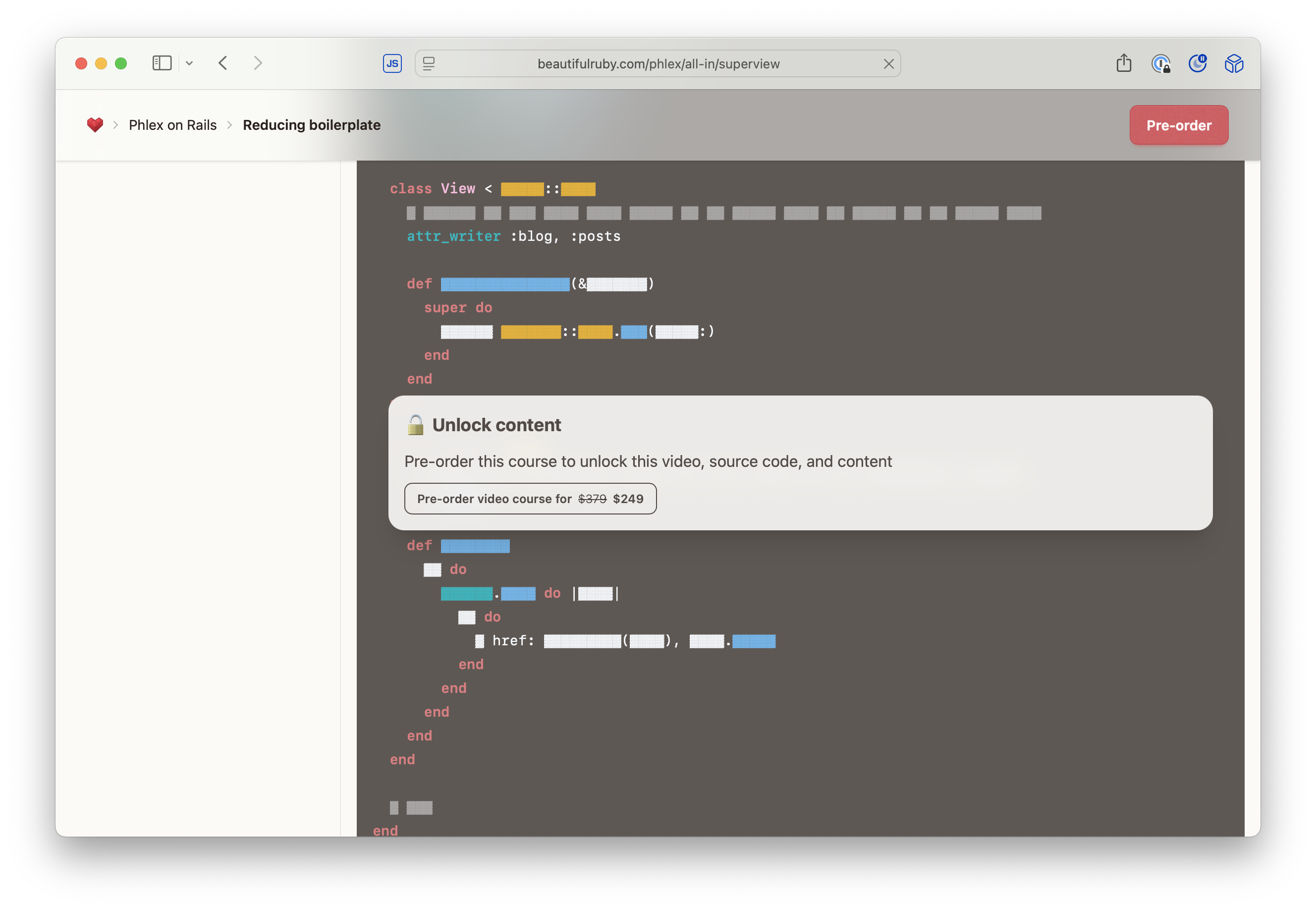](/phlex/all-in/superview)
Let's take a closer look.
### Markdown redactor
At the core of the paywall is a parser that replaces characters with a unicode placaholder. It parses the output of the markdown HTML and splits it into a preview, which people can see, and redacted content, which has the unicode ▓ charactors.
```ruby
# ./lib/paywall.rb
class Paywall
REDACTED_CHARACTER = "▓"
attr_reader :preview, :redacted
def initialize(html)
@dom = Nokogiri::HTML.fragment(html)
@preview = slice_nodeset(@dom, 0...5).to_html.html_safe
@redacted = redact(slice_nodeset(@dom, 5..-1)).to_html.html_safe
end
private
def redact(dom)
dom.css("p").each do |element|
element.content = redact_text element.content
end
dom.css(".locked").each do |element|
element.content = redact_text element.content
end
dom
end
def slice_nodeset(dom, range)
JUN 2025
Content Paywall
A stack of components and parsers to protect locked content
If you like highly abstracted view code, you'll appreciate how concise you can express HTML with Phlex. This snippet renders an HTML table of students in an app I built to manage my local school's science fair.

```ruby
class Index < View
  # This is rendered for an `<h1>` on this views layout, which
  # is not related to the table.
  def title = "Students"

  def view_template
    # Calls the `Table` method with `Student.all` set to `@students`.
    # It ultimately renders a `<table>` tag.
    Table @students do
      # `it` is the table. We call `column` with the argument `"Student"`
      # which is set in the `table > thead > th` element.
      it.column("Student")        { show(it, &:name) }
      # The `show` method is a link helper that links to the `Teacher` model,
      # which is the same as `url_for(teacher)` in Rails.
      it.column("Teacher")        { show(it.teacher, &:last_name) }
      # The second argument `&:name`  calls it.parent.name.
      it.column("Parent")         { show(it.parent, &:name) }
      it.column("Project")        { show(it.project, &:title) }
      it.column("Registered at")  { local_time it.created_at }
      # The contents of the link can be changed by returning a value from a block.
      it.column("Interview") do |student|
        show(student.interview) { interview_name(student.interview) }
      end
    end
  end
end
```

Here's the HTML it renders:

```html
<table class="table">
  <thead>
    <tr>
      <th>Student</th>
      <th>Teacher</th>
      <th>Parent</th>
JUN 2025
A Phlex table abstraction
HTML table and hyperlink abstractions built with Phlex, Superview, and Superlink
Apple dropped the [SwiftUI WebKit](https://developer.apple.com/documentation/webkit/webkit-for-swiftui) API at WWDC 2025, which might mean my dream of Turbo SwiftUI could come true.

A few years ago, I made the source code for the [Legible News iOS app available on Github](https://github.com/legiblenews/ios-app/blob/main/Legible%20News/ContentView.swift#L29-L53) as the world's first Turbo SwiftUI app.

The snippet I like the most is the [TabView](https://developer.apple.com/documentation/swiftui/tabview):

```swift

struct ContentView: View {
    var body: some View {
        TabView {
            TurboNavigationStack(initialUrl: URL(string: "https://legiblenews.com/")!)
                .tabItem {
                    Image(systemName: "newspaper")
                    Text("Today")
                }
            TurboNavigationStack(initialUrl: URL(string: "https://legiblenews.com/week")!)
                .tabItem {
                    Image(systemName: "calendar")
                    Text("Week")
                }
            TurboNavigationStack(initialUrl: URL(string: "https://legiblenews.com/time-machine")!)
                .tabItem {
                    Image(systemName: "clock")
                    Text("Time Machine")
                }
        }
    }
}

```

Here's what it looks like in the app.

<div class="mockup-phone max-w-fit my-8 mx-auto">
  <div class="mockup-phone-display">
    <img alt="wallpaper" src="https://bradgessler.s3.amazonaws.com/OPyWbYWv8QOK83jKn27D.png"/>
  </div>
</div>
JUN 2025
Turbo SwiftUI
A dream that might be coming true

Phlex on Rails
Blocks, slots, & yielding
One of my favorite things about using the [Markdown Rails](https://github.com/sitepress/markdown-rails), [Sitepress Rails](https://github.com/sitepress/sitepress), and [URI Builder](https://github.com/rubymonolith/uri-builder) gems is how easy it is to integrate referral codes into markdown content so I don't have to think about it when I'm writing the article.

All I have to do is modify the `ApplicationMarkdown` class to intercept links the Markdown parses.

```ruby
# ./app/markdown/application_markdown.rb
class ApplicationMarkdown < MarkdownRails::Renderer::Rails
  # Code
  AMAZON_STORE_ID = "rocketship083-20"

  # This is called when a link is encountered in the markdown content
  def link(link, title, content)
    # The URI is wrapped in a builder, which makes modifications easier.
    url = URI.build(link)
    case url.uri.host
    when "www.amazon.com"
      url.query tag: AMAZON_STORE_ID
    end

    # HTML is rendered and emitted back into the HTML buffer.
    content_tag :a, href: url.to_s, title: do
      content
    end
  end
end
```

Then, when I'm writing an article, I can copy and paste whatever links I want into the markdown and never have to remember to include the referral code.

When I paste a link into my markdown like:

```markdown
[SmallRig aluminum tripod stand](https://www.amazon.com/SmallRig-Selection-Lightweight-Aluminum-Adjustable/dp/B09C8F36LC)
```
It automatically renders the HTML with the referral code:

```html
<a href="https://www.amazon.com/SmallRig-Selection-Lightweight-Aluminum-Adjustable/dp/B09C8F36LC?tag=rocketship083-20">
  SmallRig aluminum tripod stand
</a>
JUN 2025
Markdown Referral Code
Automatically inject referral codes into markdown content
Phlex Kits make writing Ruby view code look almost like Swift.

```ruby
Header {
  h1 { "Welcome to Phlex!"}
}
```

Pretty cool?
JUN 2025
Phlex Kits
A collection of Phlex components and utilities
The `Enumerator` class is a handy way to add multiple Enumerables to a class.

```ruby
class Person
  def initialize
    @addresses = []
    @emails = []
  end

  # Here it is...
  def names
    Enumerator.new do
      @array.each do |person|
        it.yield person.name
      end
    end
  end

  def emails
    Enumerator.new do
      @array.each do |person|
        it.yield person.email
      end
    end
  end
end

Person.new.names.each do |name|
  puts name
end

Person.new.emails.each do |email|
  puts email
end
```

Enumerators are a powerful tool for iterating over collections of elements. They provide a simple and efficient way to iterate over a collection of elements, without having to worry about the underlying implementation details.
JUN 2025
Enumerator
A quick way to create multiple Enumerables